


Copying From a Dead Computer
If the source computer has failed, U-Move can create a staging folder by extracting the Active Directory data files from the dead computer.
Salvage the dead computer's disk
You need to make the old C: disk partition visible on the new computer (for example as E:). Use one of the following methods, in order of preference:
- Virtual Disk: Mount the virtual hard disk's data file and expose it as a temporary drive letter (E:). See Mounting a Dead Virtual Hard Disk.
- Physical disk: Remove the hard disk from the dead computer and insert it into an external USB enclosure. Attach the USB enclosure to the new computer.
- Physical disk: Open the new computer and install the old disk drive unit on an unused NVMe or SATA port.
- Physical Disk: Copy the dead C: partition to a temporary partition on the new computer (E:) with a disk-level (not file-level) software recovery tool such as Acronis® True Image, Macrium Reflect, or Symantec Ghost. These utilities create a image of the entire disk, block-by-block.
- On Linux, you can copy the dead C: partition to a local partition using the dd command, as in the following example:
sudo dd if=/dev/sdb1 of=/dev/sdb2 bs=1024M status=progress - As a last resort, you
can attempt to manually XCOPY the
folders C:\Windows, C:\Users,
and C:\ProgramData to a
scratch folder on the new computer (for example to C:\StagingFolder\C).
This method is not supported
because it is unlikely to succeed unless it is done
very carefully.
Note: We no longer provide support using this method.
Minimum Required Folders
You must have a copy of the following folders:
\Windows,
\ProgramData,
and \Users\Administrator.
Note: Do not attempt to recreate these folders by hand. It will not work because the folders' essential metadata (ACLs and extended attributes) will be missing.
Run U-Move
Install and run U-Move. Click on the tab Clone. Select This is an emergency. My computer has failed. I need to quickly clone Active Directory. See the instructions for Emergency Move.
When you are asked to specify the location of the Active Directory files, select In a disk salvaged from the dead computer, then click Next.
When you are prompted to enter the path to the dead disk, type in the path to the root folder of the dead computer's disk image (for example “E:\”), then click Next.
More Than One Disk
If the Active Directory database files (NTDS.DIT and EDB.LOG) or the System Volume (SYSVOL) are scattered across multiple disks you need to include all the disks that contain the AD files.
For example, assume that on the dead computer your original Windows folder was in C:\Windows, SYSVOL was in D:\SYSVOL, the database files were in E:\MyAd\NTDS, and the log files were in E:\MyAd\NTDSLOG.
Method 1: Attach the old C:, D:, and E: disks to the new computer. If you already have disks C:, D: and E:, the attached disks will be labeled F:, G:, and H:.
U-Move will prompt you to enter the disk map. The disk map shows which original disk letters correspond to which local disk letters on the new computer. See figure 1.
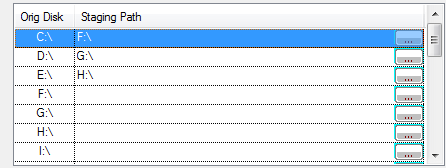
Click Next to continue.
Method 2: Manually gather together the files so that they reside under a single tree of folders (not recommended). See figure 2.
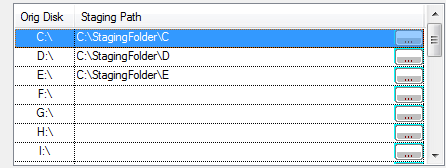
Note: Method 2 is no longer supported. You must use Method 1. Only method 1 guarantees that all of the required files will be available in the correct locations.
Recovering AD from a foreign Volume Shadow Copy snapshot
If AD is damaged on the original disk, you might be able to recover Active Directory from an old Volume Shadow Copy (VSC) snapshot that was created on the dead computer. You need to first expose the foreign snapshot as a disk letter on the destination computer.
Download and run U-Recover to expose the foreign volume snapshot as a disk letter. While the disk letter is exposed, run U-Move and use the dead disk procedure (see above).
While the disk letter is exposed enter the disk map (see above). For example, if U-Recover exposed the foreign Volume Shadow Copy (VSC) disk snapshot as drive letter F:, then in the disk map set the Original Disk to C:\ and the Staging Path to F:\.
For more information
See the topics Emergency Move and Mounting a Dead Virtual Hard Disk.
| U-Move for Active Directory |


